


Hello @NOLO ,
I am glad to inform you that this is now fixed in version 3.2.11 so no work-around is needed. In order to update to the latest version, please follow the instructions of the wizard: User's Page Login
In case you are still facing issues, please do let me know.
Regards
Johnny
Hello @NOLO and sorry for the delay. I was able to reproduce it and I have it fixed for the next version. For now if this blocks you, please try to replace the value on insert with a callback. For example:
$crud->callbackBeforeInsert(function ($stateParameters) {
if (isset($stateParameters->dat…
Hello @marneu ,
I hope this helps:
$crud->where([
'x' => 'a',
'y' => ['b', 'c']
]);
Thank you @NOLO ,
Keep in mind that search and ordering won’t work and I understand that this is maybe a deal-breaker for many people. On the other hand I am trying to make custom models to be easier to create for complicated queries. I would say setCustomQuery will mostly used on some reports (e.g…
Hello @NOLO ,
I am glad to inform you that this is now fixed on latest version 3.2.5 . It was a small fix so I haven’t include it on change logs. You can also enjoy our brand new function setCustomQuery but please keep in mind that currently it is not supporting sorting and search:
Let me know i…
Hello @NOLO ,
I can reproduce the issue locally. For now please use this work-around till this is fixed (I will keep you up to date on that):
if ($crud->getState() === 'Datagrid') {
$crud->fieldTypeSearchColumn('fecha_inicio', 'date');
$crud->fieldTypeSearchColumn('fecha_fin', 'date');
}
Hello @NOLO ,
I don’t know the structure of the tables, so I’ve guessed it is something like this:
-- Brands table
CREATE TABLE brands (
brand_id INT AUTO_INCREMENT PRIMARY KEY,
brand VARCHAR(100) NOT NULL
);
-- Models table
CREATE TABLE models (
model_id INT AUTO_INCREMENT PRIMARY KE…
Hello @tcdev0 ,
I am glad to inform you that all of the issues that you have referred to has been now fixed on the latest version 3.2.4, please keep in mind that for the default value (3) you should also use callbackAddForm for example in your case:
$crud->callbackAddForm(function ($data) {
$d…
Hello @NOLO ,
First of all thank you for the feedback  . I am glad you liked inline edit functionality. I can indeed see the issue that you are referring to and this is a defect which I was able to reproduce and also fix.
I am preparing a release for that but it may be delayed a little bit since I …
. I am glad you liked inline edit functionality. I can indeed see the issue that you are referring to and this is a defect which I was able to reproduce and also fix.
I am preparing a release for that but it may be delayed a little bit since I …Hello @NOLO ,
I am glad to inform you that this is now fixed at the latest version 3.2.3 , you can upgrade to the latest version following the wizard instructions easily: User's Page Login
Regards
Johnny
Hello @NOLO ,
Unfortunately we on purpose have this as a downloadable item for Grocery CRUD since this is the most common usage when it comes to excel export. If you would like to use your own way to export the excel (which make sense) you can use the replaceState method . There is an example for e…
Hello @NOLO ,
I am glad to inform you that this is now fixed on the latest version 3.2.1
You can follow the instructions of how to upgrade to the latest version by the wizard here: User's Page Login
Let me know if the upgrade is fixing the ILIKE issues you had with Postgres.
Regards
Johnny
Hello @NOLO ,
I see what you mean. Yes, I can reproduce the issue that you are referring to. I will try to have a fix for that and for the Model to use ILIKE instead of LIKE, so you won’t need to have a custom Model either.
Regards
Johnny
Hello @NOLO ,
You need to start typing and after 2 characters it will start searching. I will check if I can do it more user friendly to show this message directly to the user, like when you type 1 letter you see this:
[Screenshot 2025-07-19 at 6.54.42 AM]
Regards
Johnny
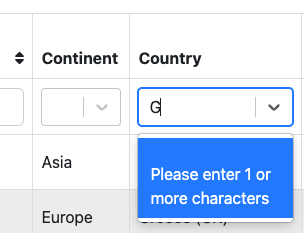
Hello @kapilchugh ,
I am glad to inform you that tabs functionality is now released into version 3.1.12  You can see the documentation of how to add the group fields (I’ve named it like that) here: groupFields | Grocery CRUD - A PHP CRUD Generator Library
You can update with the simple steps that…
You can see the documentation of how to add the group fields (I’ve named it like that) here: groupFields | Grocery CRUD - A PHP CRUD Generator Library
You can update with the simple steps that…Hello @NOLO ,
I am glad to inform you that this is now fixed at the latest version 3.1.9 which was released today
Enjoy
Johnny
Enjoy
JohnnyFantastic @NOLO ! Thanks for the feedback This issue is reproducible and has been fixed in version 3.1.9, which will be released soon.
In the meantime, as a workaround, you can hide the checkbox by adding the following CSS to your project:
CSS:
[class^="gc-checkbox-"] {
display: none;
}
Reg…
This issue is reproducible and has been fixed in version 3.1.9, which will be released soon.
In the meantime, as a workaround, you can hide the checkbox by adding the following CSS to your project:
CSS:
[class^="gc-checkbox-"] {
display: none;
}
Reg…Hello @NOLO ,
There is a restriction due to the modal page we use. Instead please use the configuration open_in_modal to false. If you would like to assign this configuration only to one CRUD form (e.g. not everywhere, you can use the setConfig function. For example for your case you can use it lik…
Hello @NOLO ,
I am glad to inform you that the version 3.1.1 now has the field type “boolean”. Enjoy
Hello @NOLO,
I just wanted to inform you that I can finally reproduce the issue. I will investigate and keep you updated once I have a solution.
Regards
Johnny