

hello @johnny .
after update, all my GCE date format changed to m/d/Y. Why is this happening ?
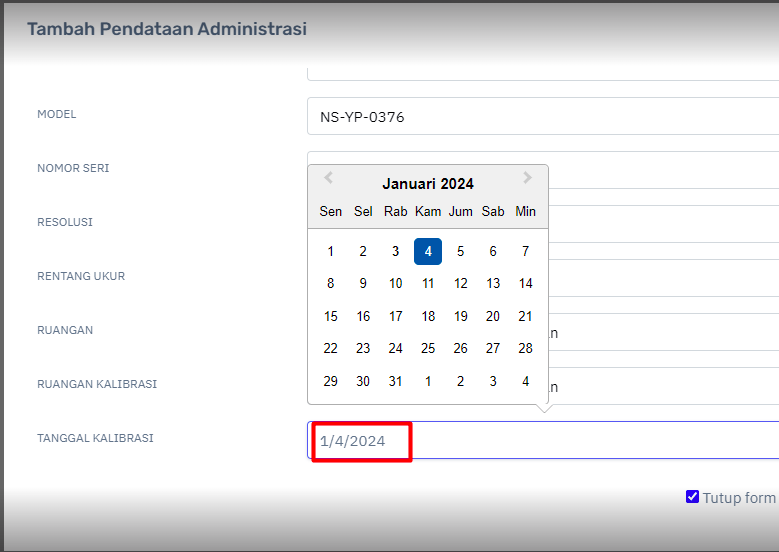
before update, my datepicker format was d/m/Y.
Also, date format on config is no longer there.
hello @johnny .
after update, all my GCE date format changed to m/d/Y. Why is this happening ?
before update, my datepicker format was d/m/Y.
Also, date format on config is no longer there.
Hello @heruprambadi ,
The datepicker is now taking from the browser format. Is your OS date format different? Some people also prefer the native date picker which you can enable it like this:
$crud->fieldType('fieldName', 'native_date');
Also when you are referring from version upgrade, you mean from version 2 to version 3 right? If so then there are migration steps also for you to know: Migrating from v2 to v3 | Grocery CRUD - A PHP CRUD Generator Library which it is very helpful when there are upgrade issues.
Let me know if that worked.
Regards
Johnny
i said update @johnny not upgrade  it’s update from v 3.0.15 to 3.0.16.
But i’m not sure this is happened after GCE update or crome update.
Never mind, $crud->fieldType(‘fieldName’, ‘native_date’); solved my problem. I preffer to use this date picker. HTML date picker now is awesome
| Topic | Replies | Views | Activity | |
|---|---|---|---|---|
| Setting quick search values via JavaScript not working properly for booleans |

|
0 | 563 | Nov 2025 |
| callbackColumn() has not effect in v3.2.6 Enterprise |


|
2 | 696 | Dec 2025 |
| displayAs() doesn’t support new line in headings |
|
4 | 871 | Jan 5 |
| Inline edit has problems if the column width is set |
|
2 | 842 | Feb 28 |
| PRINT date format not consistent |
|
6 | 354 | Sep 7 |
