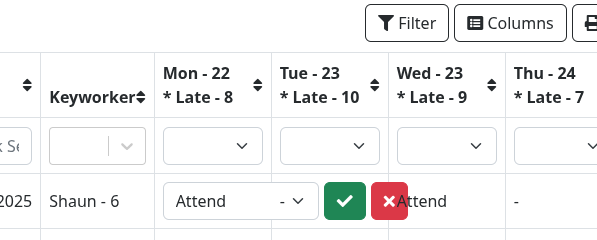
If the user sets the width of a column with the Columns menu.
And the width is less than the width required for inline editing, the buttons spread across the next columns and can’t be clicked. So the inline edit can not be canceled.
The ugly workaround is to tell the user not to set the column width.
Is there a more elegant workaround?
Maybe make inline editing ignore the column width?
Hello @mopac and thanks for the detailed bug report. I will try to fix this issue for the next version. Till then you can maybe use a small JavaScript work-around for that:
You can add this in a JavaScript file that you call and you can remove it once this is fixed in a later version (I will inform you once this is ready). Just make sure that you have: