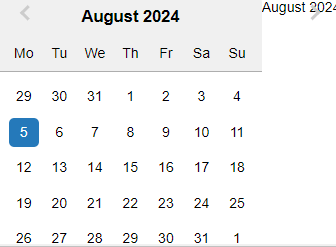
Hello @kapilchugh and thank you for pointing that out. I haven’t noticed this issue before  . I’ve just fixed it since the issue was that it had outdated CSS for the react-datepicker component. This will be fixed at the next version
 3.1.9.
In the meantime, as a workaround, you can resolve the issue by updating the react-datepicker.min.css file, which is outdated.
If you’re using the Codeigniter 4 version, you can find this file under:
public/vendor/grocery-crud/css/react-datepicker/
To fix the UI issue, download the latest version of react-datepicker.min.css from this link (I’ve just added it as a gist) and replace the old file.
Also don’t forget to clear your browser cache to see the change. Let me know if that worked for you.
Regards
Johnny