post by larasmith on Sep 10, 2021

I noticed that when uploading files, upon change of uploaded files or deletion of the actual record, the uploaded file is retained in the upload folder of my site.

Is there a way to automatically delete them upon doing those actions?

I tried using PHP’s unlink but no luck…

Thanks in advance!

post by johnny on Sep 12, 2021

Hello @larasmith and welcome to our new forums :star2:

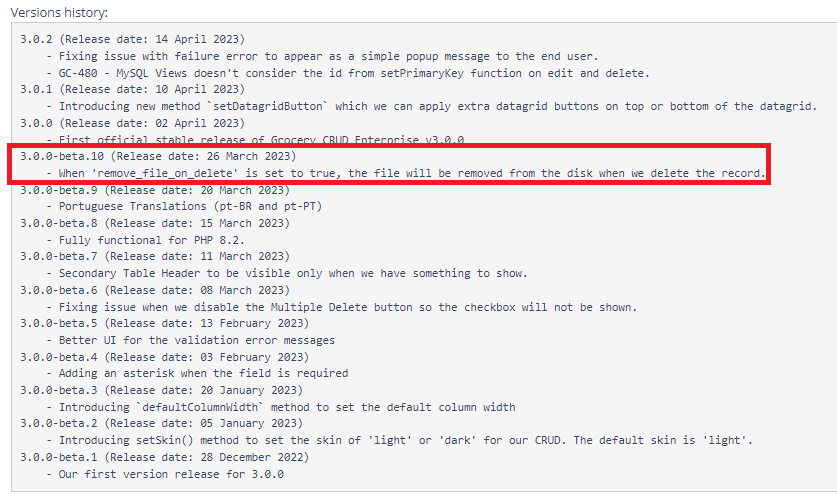
Currently the implementation that we have doesn’t support the delete file with actual delete of the file as it was a security issue. The good news is that currently I am refactoring some parts of the upload functionality for the next release (2.9.0) so I can include some callbacks for the deletion of the file.

As there are still the same security issues it is very possible that I will not have a configuration of “real_file_delete_on_delete” (true or false) as this can still be a security issue for a various of reasons that I can send you through PM if you are interested :slight_smile:

The release will probably come sooner than later but till then, you can use the callbackBeforeUpdate and use unlink. If you’ve already done that maybe you can send us some code to check the callback that you used? Also can you please us know which version of Grocery CRUD Enterprise are you using?

Regards
Johnny

post by larasmith on Sep 14, 2021

Hi @johnny! It so nice to be back in using GroceryCRUD :sunglasses:.

This version that I am currently working on is still on version 2.7.9.

I created a callback that was able to delete the uploaded file:

  function deleteAccessFile($file)
  {
      $filePath = $_SERVER['DOCUMENT_ROOT'].'/'.FOLDERNAME."/assets/uploads/$file"; 

      if (file_exists($filePath)) {
        
        // Use unlink() function to delete a file 
        if (!unlink($filePath)) { 
          $message = ("$filePath cannot be deleted due to an error."); 
        } else { 
          $message = ("$filePath has been deleted."); 
        } 

      } else {
          $message = "The file $filePath does not exist.";
      }

      return $message;
  }

Currently, I use this before the deletion of the record:

      $crud->callbackBeforeDelete(function ($stateParameters) {
          $file = $this->m_FileProcessing->getFileName($stateParameters->primaryKeyValue);
          $this->deleteAccessFile($file); 

          return $stateParameters;  
      });

I hope it helps someone too :blush:

post by johnny on Sep 14, 2021

I am glad that you could find a work-around for this @larasmith ,

As always thank you to always help the community :slight_smile:

Regards
Johnny

4 months later

post by markab on Jan 19, 2022

Did this function get implemented?

I would like to delete the file when deleting the attachment.
I would like to delete the file(s) when deleting the record.

Thanks,

post by larasmith on Jan 20, 2022

post by markab on Jan 22, 2022

This is fine if you want to delete the complete record. But what if you want to just remove the attachment from the record, does it delete the file that is linked?

post by johnny on Jan 23, 2022

Hello @markab ,

Currently there is not any callback for the remove file trigger. On the other hand there is a work-around that is also the correct way to remove the file. You can use the function callbackBeforeUpdate to see if the file was changed. For example something like this:

$crud->callbackBeforeUpdate(function ($stateParameters) use ($customerModel) {
    $id = $stateParameters->primaryKeyValue;
    $currentImageUrl = $stateParameters->data['image_url'];

    $previousImageUrl = $customerModel->getCustomerById($id)->image_url;

    if (!empty($previousImageUrl) && $currentImageUrl !== $previousImageUrl) {
        unlink('your/path/to/file/' . $previousImageUrl);
    }

    return $stateParameters;
}); 

This is a better way to do it because a user may remove will not accidentally remove the file. This is making sure that the file will be removed only after the “Save” button is pressed.

Regards
Johnny

1 year later

post by ajuser on Mar 23, 2023

1 month later

post by larasmith on Apr 25, 2023

post by ajuser on Apr 25, 2023

Yes, thank you very much, I was talking to John and everything was perfect. :wink:

1 / 11
Sep 2021