
post by heruprambadi on Oct 20, 2023


post by johnny on Oct 21, 2023
Hello @heruprambadi ,
I don’t understand what is your question to be honest. Would you like to trigger this event but for detailed/master form?
Regards
Johnny
post by heruprambadi on Oct 21, 2023
Hello john. I want to create javascript input mask like this JSFiddle - React, Tailwind, and code Playground
How to create it in gc ? I try like this article JavaScript Events | Grocery CRUD - A PHP CRUD Generator Library but doesn’t work.
Anyway, you can click on word “this” in my question above 
post by johnny on Oct 23, 2023
Hello @heruprambadi ,
You will need to:
- Enable the “publish_events” from configuration to true
- Use callbackAddField | Grocery CRUD - A PHP CRUD Generator Library and callbackEditField | Grocery CRUD - A PHP CRUD Generator Library for your input and make sure that the input
- Use the events ‘gcrud.form.add-load’ ‘gcrud.form.edit-load’. For example:
window.addEventListener('gcrud.form.add-load', ({detail}) => {
    // Your custom JavaScript here
});
I hope this helped.
Regards
Johnny
post by heruprambadi on Oct 23, 2023
Thx @johnny now i’m able to do it. I need this event “gcrud.form.add-load” to make it work.
I hope future GCE have feature like money input mask, because some user type 1.000.000, another user type 1,000,000, and the other type 1000000. We need to make standart for it.
For you who expriencing similar problem with me, i’m just gonna put it here, in case you need it.
callback add field in controller :
        $crud->callbackAddField('nama', function ($fieldType, $fieldName) {
            return '<input type="text" name ="nama" class = "myForm">';
        });
script in view file :
<script>
    window.addEventListener('gcrud.form.add-load', ({
        detail
    }) => {
        let input = document.getElementsByClassName("myForm");

        console.log(input.length);

        for (var i = 0; i < input.length; i++) {
            input[i].addEventListener("keyup", (e) => {
                formatCurrency(e.target);
            });
            input[i].addEventListener("keypress", (e) => {
                formatCurrency(e.target);
            });
        }

        function formatNumber(n) {
            // format number 1234567,89 to 1 234 567,89
            return n.replace(/\D/g, "").replace(/\B(?=(\d{3})+(?!\d))/g, ",")
        }

        function formatCurrency(input) {
            var input_val = input.value;
            if (input_val === "") {
                return;
            }
            var original_len = input_val.length;
            var caret_pos = input.selectionStart;
            input_val = formatNumber(input_val);
            input.value = input_val;
            var updated_len = input_val.length;
            caret_pos = updated_len - original_len + caret_pos;
            input.setSelectionRange(caret_pos, caret_pos);
        }
    });
</script>
post by heruprambadi on Oct 23, 2023
i’m sorry @johnny , it works for normal form, but still doesn’t work for master detail form 
post by heruprambadi on Oct 23, 2023
@johnny it doesn’t work if we use it on master detail :

But if we open master detail link directly, it works.

post by johnny on Oct 26, 2023
Hello @heruprambadi ,
That’s weird. I will check it and let you know. Probably during the weekend.
Regards
Johnny
post by johnny on Oct 28, 2023
Hello @heruprambadi ,
I confirm that this is a Grocery CRUD bug and this will be fixed for the next version.
I will keep you updated once the new version is released.
Regards
Johnny
post by heruprambadi on Oct 28, 2023
Ok @johnny , i’ll wait for the next version. Thank’s.
20 days later
post by johnny on Nov 18, 2023
Hello @heruprambadi ,
I am glad to inform you that the new version is now released (3.0.15) . You can download it from here:
Let me know if you are still having issues with the publish of the events on master-detail grid.
Regards
Johnny
post by heruprambadi on Nov 18, 2023


7 months later
post by heruprambadi on Jun 5, 2024
Hello @johnny , i confirm this not work with the latest version of GCE (V3.1.4). I just update my GCE using “composer update --prefer-dist” and my input mask not working anymore. I try to replace my GCE with the old one, and it working again. Any solution for this ?
post by johnny on Jun 8, 2024
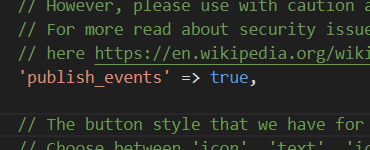
Hello @heruprambadi that’s weird since I haven’t changed anything related with this change. Can you please check if publish_events configuration is set to true ? This will only work when this is true, the default configuration is false.
Regards
Johnny
post by heruprambadi on Jun 9, 2024


post by johnny on Jun 12, 2024
Hello @heruprambadi ,
That’s weird! I will check it and let you know.
3 months later
post by johnny on Sep 12, 2024
Hello @heruprambadi ,
Are you still having the same issues even with the latest version? 3.1.9 ?
Regards
Johnny
New & Unread Topics
| Topic | Replies | Views | Activity | |
|---|---|---|---|---|
| Use callbackColumn() but keep inline edit functionality |


|
3 | 633 | Apr 12 |
| callbackColumn() has not effect in v3.2.6 Enterprise |

|
2 | 683 | Dec 2025 |
| Inline edit has problems if the column width is set |
|
2 | 830 | Feb 28 |
| PRINT date format not consistent |
|
6 | 333 | Sep 7 |
| “Ooooops, something went wrong! If you can see this message, this is probably a misconfiguration in Grocery CRUD Enterprise!” |

|
6 | 234 | 4d |