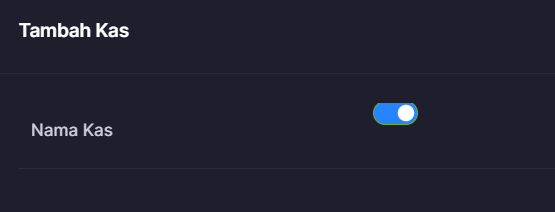
post by heruprambadi on Apr 17, 2023

post by mariel_alberto on Apr 17, 2023

post by johnny on Apr 18, 2023

Hello @heruprambadi and welcome to our forums :hugs:

The use of checkbox_boolean doesn’t take any options at the moment. So the use is as follows:

$crud->fieldType('field_name', 'checkbox_boolean');

Which only takes the arguments 0 or NULL (depends if your field is nullable) and 1 if checked.

This is currently hardcoded values and I would like to revisit it to be honest for Grocery CRUD version 3 which is removed for now. I guess your point is valid, to have custom values but maybe the field name also will be a different one such as checkbox instead of checkbox_boolean.

Regards
Johnny

post by Penn on Apr 23, 2023

$crud->fieldType(‘field_name’, ‘checkbox_boolean’, [
‘N’ => ‘No’,
‘Y’ => ‘Yes’,
]);
In this code, ‘field_name’ refers to the name of the field you want to use the ‘checkbox_boolean’ type for. The second parameter (‘checkbox_boolean’) tells Grocery CRUD that you want to use the checkbox boolean type. The third parameter is an array that maps the values that will be stored in the database (N and Y) to the labels that will be displayed in the interface (‘No’ and ‘Yes’ respectively).

If this still doesn’t work, please provide more details about the issue you are facing, such as error messages or unexpected behavior.

post by heruprambadi on Apr 26, 2023

like johnny said above penn, it doesn’t take any options at the moment. Have you tried option :

[
‘N’ => ‘N’,
‘Y’ => ‘Y’,
]

it doesn’t do anything..

post by heruprambadi on Apr 26, 2023

10 months later

post by johnny on Feb 10, 2024

Hello @heruprambadi ,

Glad to inform you that version 3.1.1 is now released and it is also including this change. The new field type is ‘boolean’. Let me know for any feedback :slight_smile:

Regards
Johnny

post by heruprambadi on Feb 13, 2024

post by johnny on Feb 15, 2024

Hello @heruprambadi ,

Currently the ‘boolean’ is used like this:

$crud->fieldType('nama', 'boolean');

and have no options at the moment.

The output should look like the one that you have in the screenshot but I don’t know why it is not aligned. Do you have extra CSS for your bootstrap theme?

I guess you are interested about a new field ‘checkbox’ which could have two values right?

Regards
Johnny

1 / 9
Apr 2023