
hello @johnny
i use new version 3.0.9 with php 8.1
value of form not send when submit button is press
this is the picture

this is my controller

and this is my view to generate combobox

hello @johnny
i use new version 3.0.9 with php 8.1
value of form not send when submit button is press
this is the picture
Hello @nasrul ,
This is probably an issue with a JavaScript plugin that you use? Can you share the callbackAddField function that you use?
Regards
Johnny
thanks for your replay @johnny
i change my combobox with pure html
but the value still not send
this is my callbackAddFields
this is my complete controller @johnny
public function floor()
{
$test = $this->action_get;
$test2 = $this->action_post;
$crud = $this->grocery->_getGroceryCrudEnterprise();
$crud->defaultOrdering('id', 'desc');
$crud->setTable('mst_floor');
$crud->setSubject('Floor', 'Floor');
$crud->callbackAddForm(function ($data) {
    $data['created_by'] = Auth::user()->id;
    return $data;
});
$crud->columns(['barang_id','jumlah','satuan_id','keterangan']);
$crud->setRelation('barang_id','mst_barang','nama');
$crud->setRelation('satuan_id','mst_satuan','nama');
$crud->displayAs('barang_id','Barang');
$crud->displayAs('satuan_id','Satuan');
$crud->fieldType('updated_date','invisible');
$crud->fieldType('updated_by','invisible');
$crud->fieldType('created_date','invisible');
$crud->fieldType('created_by','hidden');
$crud->fieldType('created_at','invisible');
$crud->fieldType('deleted_by','invisible');
$crud->fieldType('deleted_at','invisible');
$crud->requiredFields(['barang_id','jumlah','satuan_id','keterangan']);
$crud->callbackAddField('barang_id', function ($fieldType, $fieldName) {
    return "<select name='$fieldName' class='form-control'><option value='1'>satu</option><option value='2'>Dua</option>";
    // return view('plugins.chosen_barang_floor')->render();
});
// $crud->callbackAddField('barang_id', function ($fieldType, $fieldName) {
//     return view('plugins.chosen_barang_floor')->render();
// });
$crud->callbackAddField('satuan_id', function ($fieldType, $fieldName) {
    return view('plugins.chosen_satuan')->render();
});
$crud->callbackEditField('barang_id', function ($fieldValue, $primaryKeyValue, $rowData) {
    return view('plugins.chosen_barang_floor',['barang_id'=>$fieldValue])->render();
});
$crud->callbackEditField('satuan_id', function ($fieldValue, $primaryKeyValue, $rowData) {
    $getBarangId = DB::table('mst_floor')->where('id',$primaryKeyValue)->first();
    return view('plugins.chosen_satuan',['satuan_id'=>$fieldValue,'barang_id'=>$getBarangId->barang_id])->render();
});
$crud->callbackAfterInsert(function ($stateParameters) {
    $redirectResponse = new \GroceryCrud\Core\Redirect\RedirectResponse();
    return $redirectResponse->setUrl('/admin/floordetail/' . $stateParameters->insertId);
});
$crud->setActionButton('Detail', 'fa fa-info', function ($row) {
    return '/admin/floordetail/' . $row->id;
}, false);

$output = $crud->render();
$menu = array('menuMaster' => 'here show','menuFloor'=>'active');
$customHrefAddButton = view('plugins.chosen')->render().view('plugins.chosen_grocery_crud')->render();
$extra = array('menu'=>$menu,'jsExtra'=>$customHrefAddButton);
return $this->grocery->_showOutput($output,null,$extra);
}
Hello @nasrul ,
This was a Grocery CRUD bug and I’ve fixed the issue for the latest version. Since this was a very small frontend change, I’ve redeployed version 3.0.9 today so in case you have downloaded the version earlier please download it again and let me know if this is working for you.
Regards
Johnny
Thank you @johnny
I’ve tried to update to the latest version but it still doesn’t work
I tried to update by
Regards
Nasrul
Hello @nasrul ,
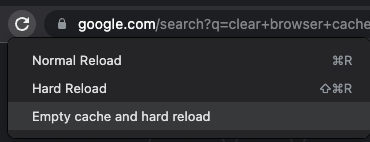
I think the only thing extra you need is to do a hard refresh. More specifically:
If this is still not working then it is probably a cache issue with composer. Try to do something like this:
composer install --no-cache
And let me know if that worked for you.
Regards
Johnny
If the above still doesn’t work, then please try to remove the package and then install it again like this:
composer remove "grocery-crud/enterprise"
composer require "grocery-crud/enterprise:3.*.*@dev" --no-cache
And of course don’t forget to also copy the assets files since the change is on the JavaScript files.
Regards
Johnny
thanks so much @johnny its running well now
I am very glad to hear that  Thanks for letting me know
| Topic | Replies | Views | Activity | |
|---|---|---|---|---|
| Use callbackColumn() but keep inline edit functionality |


|
3 | 664 | Apr 12 |
| Setting quick search values via JavaScript not working properly for booleans |
|
0 | 572 | Nov 2025 |
| callbackColumn() has not effect in v3.2.6 Enterprise |

|
2 | 705 | Dec 2025 |
| displayAs() doesn’t support new line in headings |
|
4 | 886 | Jan 5 |
| Inline edit has problems if the column width is set |
|
2 | 853 | Feb 28 |