
post by bgeneto on Feb 1, 2024


post by johnny on Feb 3, 2024
Hello @bgeneto ,
No problem. Changed it to 30px minimum for the next version 
post by johnny on Feb 10, 2024
Hello @bgeneto ,
Glad to inform you that version 3.1.1 is now released and it is also including this change.
Regards
Johnny
post by bgeneto on Feb 10, 2024
Hi, @johnny !
Regretfully, I’m still unable to change the column width below about 100 pixels. Allow me to demonstrate:
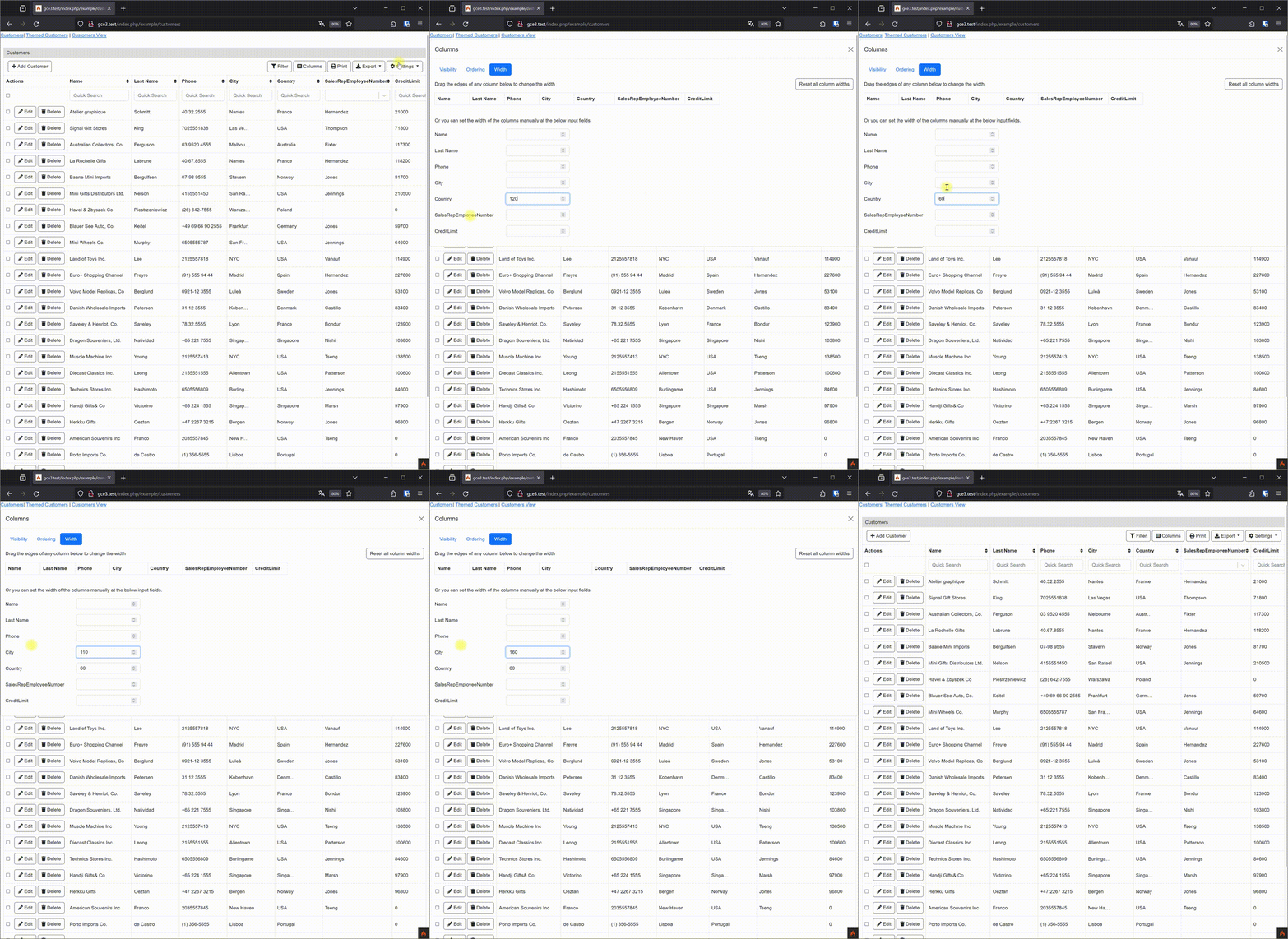
Perhaps this minimal column width is the culprit?
[class^="gc-search-column-"] {
	min-width: 160px;
}
Kind Regards!
post by johnny on Feb 11, 2024
Hello @bgeneto ,
Yes I can reproduce the issue as well. I will investigate into that . Something is pushing the table to have more width. Good news is that it is reproducible so once I will find a solution this can be released with a newer version (but I will update master first to confirm it with you before the release)
Regards
Johnny
post by johnny on Feb 18, 2024
Hello @bgeneto ,
After lot of back and forth and testing, I’ve fixed the issues that I had with the minimum width. I am still testing some edge cases scenarios. The new minimum width will be 60px (best I can do so things will not start breaking). This will be available at the next version, which I will let you know once this is available.
Regards
Johnny
13 days later
post by johnny on Mar 2, 2024
Hello @bgeneto ,
I am glad to inform you that the latest version 3.1.2 now includes this fix. Let me know if you are still having issues with the minimum width.
Regards
Johnny
New & Unread Topics
| Topic | Replies | Views | Activity | |
|---|---|---|---|---|
| Use callbackColumn() but keep inline edit functionality |


|
3 | 648 | Apr 12 |
| callbackColumn() has not effect in v3.2.6 Enterprise |

|
2 | 696 | Dec 2025 |
| displayAs() doesn’t support new line in headings |
|
4 | 871 | Jan 5 |
| Inline edit has problems if the column width is set |
|
2 | 842 | Feb 28 |
| PRINT date format not consistent |
|
6 | 354 | Sep 7 |